USB Serial
The USB Serial protocol allows capturing data from devices physically connected to the USB ports of the computer where InDataX (or its nodes) is running. It is the ideal solution for integrating barcode readers, industrial scales, sensors with serial output, and other hardware that lacks network connectivity.
Protocol Configuration
To configure the communication, these parameters must be defined:
- Name (Nombre): Unique identifier for the protocol.
- USB Port (Connection order) (Puerto USB - Orden de conexión): Unlike other systems that use fixed COM port names (such as COM3), InDataX can use the connection order. This provides stability if the operating system reassigns port names upon rebooting or reconnecting devices.
Once configured, the Variable Management (Gestión de Variables) button allows you to define which data to extract from the serial communication.
Variable Configuration
As with the Ethernet protocol, variables in USB Serial are extracted by analyzing the incoming data frame (usually in text format) and cropping the necessary characters.
- Name (Nombre): Identifying name of the variable.
- Type (Tipo): The data type to which the extracted text will be converted (e.g., Real, Integer).
- Audit trail: Audit record for value changes.
- Record value (Registrar valor): Inclusion in the Thing's historical records.
- Frame Start (Inicio trama): Character position where the data begins (1-based).
- Frame End (Final trama): Character position where the data ends.
System Logs Viewer
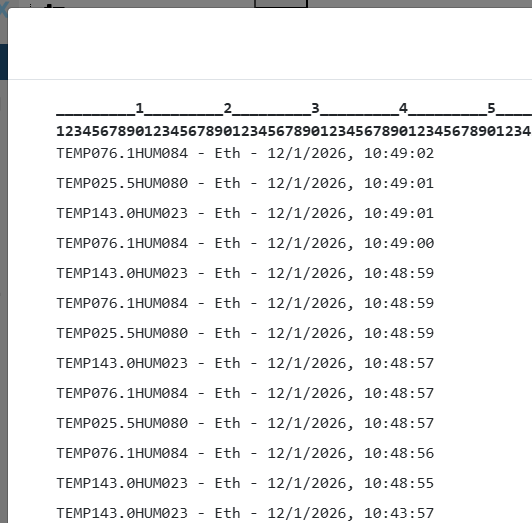
To facilitate variable configuration and position identification within the frame, InDataX features a real-time log viewer.
How to access
Right-click on any empty area of the Modelizer canvas and select the System logs (Logs del sistema) option.

Viewer Usage
The viewer shows incoming frames (both from Ethernet and USB Serial) along with a numeric legend at the top. This legend allows you to quickly identify the index of each character, making it easier to define the Frame Start and Frame End fields.
In addition to the raw data frame, InDataX automatically appends contextual information to the end of each line:
- The protocol the frame belongs to.
- The exact date and time when the system received the information.
Please note that these additional data points (protocol and date/time) are exclusive to the log viewer. They are not part of the actual raw data frame sent by the device, and therefore cannot be captured via variables. When configuring Frame Start and Frame End, you must base your indexing solely on the device's raw data.
At the top, you have a text Filter that allows you to search for specific strings within the logs, which is very useful for isolating frames from a specific device in high-traffic environments.