Radial Gauge
The Radial Gauge element allows visualizing numeric values on a circular needle indicator. It is ideal for representing analog measurements such as pressure, temperature, or speed, offering a quick and intuitive reading of a variable's state within a defined range.
Properties marked with bolt allow dynamization from an expression with variables.
General
Basic identification and position configuration.
Name (string)
Unique identifier of the element.
Description (string)
Optional descriptive text.
X bolt (number)
Horizontal position in pixels.
Y bolt (number)
Vertical position in pixels.
Z bolt (number)
Depth index (z-index).
Width bolt (number)
Width of the element in pixels.
Height bolt (number)
Height of the element in pixels.
Style
Visual customization of the component.
Hidden bolt (boolean)
Makes the element invisible.
Background Color bolt (color)
Background color of the gauge.
Border Radius bolt (number)
Corner rounding of the container.
Rotate bolt (number)
Rotation angle in degrees.
Transition (string)
CSS transition definition.
Pointer Color (color)
Color of the value indicator.
Shadow (string)
Allows selecting a predefined shadow level (None, Small, Medium, Large).
Anchor Point [Vert./Horiz.] (string)
Defines which edge of the element acts as the fixed position reference.
Advanced
Range and scale configuration.
Variable (Tag)
System variable that will determine the value indicated by the needle.
Minimum Value (number)
Initial value of the gauge scale.
Maximum Value (number)
Final value of the gauge scale.
Interval (number)
Numerical separation between the main divisions of the scale.
Decimals (number)
Number of decimal places to show in numeric values.
Radius Size (number)
Gauge radius as a percentage relative to the container size (e.g., 75).
Angles (object)
Arc aperture configuration.
- Start (
number): Start angle in degrees (e.g., 135). - End (
number): End angle in degrees (e.g., -135).
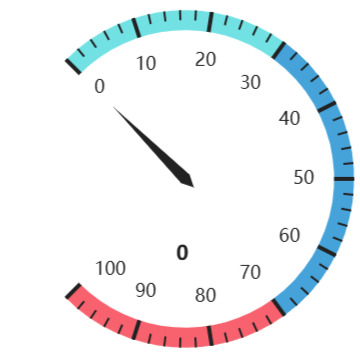
(135° to -135°)
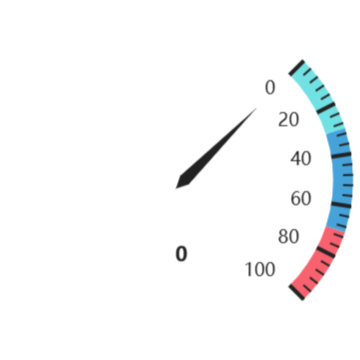
(45° to -45°)
Axis Ticks (object)
Configuration of subdivision marks (minor ticks). These are the small lines that appear between the main numbered values (e.g., the intermediate marks between 10 and 20) to provide greater visual precision in the reading.
- Position (
number): Offset adjustment relative to the default position. - Width (
number): Length of the tick line. - Color (
color): Tick color.
Split Line (object)
Style of the main division lines. These lines align exactly with the numeric values shown on the axis label (usually round numbers like 0, 10, 20, etc.), clearly marking the main milestones of the scale.
- Position (
number): Offset adjustment relative to the default position. - Width (
number): Thickness of the line. - Color (
color): Line color.
Axis Label (object)
Configuration of the numbers shown on the scale.
- Position (
number): Offset adjustment relative to the default position. - Color (
color): Text color. - Font Size (
number): Font size. - Rotation (
number): Text rotation in degrees.
Value Label (object)
Style of the current numeric value shown in the center.
- Units (
string): Optional unit text (displayed next to the value). - Color (
color): Text color. - Position (
number): Offset adjustment relative to the default position. - Font Size (
number): Font size.
Highlights (Array)
Configuration of colored zones on the arc (e.g., safe zone, warning, danger). Defined sequentially by setting the upper limit of each segment.
- To (
number): Upper limit value of the current range. - Color (
color): Color the arc will take up to this value. - Text (
string): Optional label associated with the range. Note: If text is defined for any range, the Axis Labels (numbers) will be automatically hidden. To display scale numbers, ensure this field is left empty for all ranges.